

Blog
Welcome


Recent posts
SEARCH RESULTS FOR: Photojunction Store

A few weeks ago we gave you a sneak peek at a major upgrade to our Client Galleries, designed to make it easier than ever for wedding and portrait photographers to sell print products to their clients. It' s based on what we've learned from the success of Print Shop, our other online sales platform. We're delighted to announce that it's now live, and accessible on all paid Workspace plans. Here we'll step you through the main features, but first, we're often asked — why do we offer two platforms? Because the customers are totally different, and so To View More >>
This entry was posted in Product Updates by Ian Baugh

Something changed for the better a few months ago, when we launched Print Shop, our platform for photographers and artists who are selling their work online as decor or works of art. Print Shop users have been very successful selling more expensive, more profitable, products — frames rather than loose prints, for example, larger frames rather than smaller ones. The work is beautiful, of course, and it is being sold as wall art, but we do think the Print Shop "store front" and product previews have helped with this success. That's why we're making the To View More >>
This entry was posted in Product Updates by Alexandria Baugh

In our latest beta we've been doing all the normal things like fixing bugs and tweaking the Queensberry order process but you can read about that in our release notes - I'm excited and I want to jump to our headline! Imagine being able to present your album online and get your clients' feedback and approval from directly within Photojunction. Photojunction has teamed up with albumexposure, the contagiously easy online album proofing tool. We've integrated things so you can register with albumexposure directly in Photojunction and upload your design from PJ to your albumexposure account in just To View More >>
This entry was posted in by Admin
On occasion you may need to send us new or edited files for an order, and I posted the other day about how to do this in Workspace. Here's how to do the same in Photojunction. Start at the Photojunction Welcome screen. Select the Uploads tab. Select the original upload for this order, so it's highlighted. Click the "More" button and select "Upload additional images". Photojunction will open up a new window to drag and drop your files into. You will be asked to give a reason for your upload. This just helps us to understand why we are receiving new files, or what to do with them. Once you have To View More >>
This entry was posted in , by Admin

You may have read AlbumExposure's announcement that Photojunction integration with their service is about to end. Sorry to say, that day has come, with the new PJ version just released, which you can download here. We've enjoyed working with the guys at AE, and we surely wish them well, but in the end the cost of integrating and supporting AE, for pretty much no return, is unsustainable. But every Photojunction user has a great alternative, so read on for an offer to get you started... ALBUM PROOFING IN WORKSPACE Album proofing is already Workspace's most popular feature, and no wonder. 1. All To View More >>
This entry was posted in , , by Admin

Hello Dears We haven't spoken for an age, but the latest Photojunction release is dear to my heart, so I thought I'd put down my knitting and tell you about it. The PJ boys are very conscious that the Problem Reporter can be frustrating, so they've added a check box which, if you want to, lets you "hide" PJ's warnings (marked with yellow triangles*) so they don't show up again. Now I wouldn't ignore automatically the problem reporter, but it can be a bit bossy sometimes, so this does feel very grown up, don't you think? A bit like the first time you realised people weren't asking you for ID any To View More >>
This entry was posted in by Admin

Tweet tweet... Queensberry and Photojunction are officially on Twitter. Queensberry: @queensberrynz Photojunction: @photojunction If you're a social media maven we're there to learn, join the conversation and connect with you. We'll be tweeting and re-tweeting all sorts of things – not just our own posts and observations but anything we come across you could be interested in - like this re-tweet from a few days ago: @queensberrynz Hard-hitting article from Gary Fong - what's wrong with wedding photography today - Ian. http://ow.ly/1Hyue Plus, if you're looking for a few more (interesting) people To View More >>
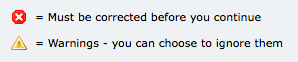
Ideally I like to see the Problem Reporter empty every time I finish a design, but it isn't always, and you're probably the same. By default, any errors you can't ignore are listed first in the Reporter - the ones with the little red and white "X" against them. We can't make your album until they're corrected, so PJ won't let you send your order until they are. The items with the little yellow warning triangle you can ignore if you like. They're sorted into spacing issues, then sizing issues, and lastly alignment issues. Obviously, you want to take care of your red issues first. Complete your album To View More >>
This entry was posted in by Admin
Why not design your albums in Photoshop or InDesign? A lot of people do, and they're great applications – we depend on them both ourselves. A few thoughts … Adobe don't think designing your albums in Photoshop is a good idea. That's not what it's for. Adobe's page layout software is InDesign. So how much does InDesign know about wedding and portrait photographers, their workflow, their albums and their suppliers? InDesign doesn't know what DPI your lab needs, or what file type, or what size the printed layouts should be, or about bleed and trim requirements, or what colour management processes To View More >>
This entry was posted in by Admin
Hi All, we need a favour. Our newest recruit, Angelique, is taking some time off to have a baby. (Congrats again to Angelique and Pete.) But while Angelique is off on leave we'll need a temporary replacement to help with Photojunction support - answering emails, phone calls, tweets, and Facebook posts (with a dash of blogging). You can work from home (as New Zealand can be a killer commute) and use your own computer. Other than that we'll sort you out with software and a phone to get the job done. Here are a few details: - Monday - Friday, 9am - 3pm EST (If you can't figure out how those hours To View More >>
This entry was posted in by Admin
Email: info@queensberry.com
Free Phone Numbers:
New Zealand: 0800 905 905
Australia: 1800 146 251
USA: +18668350851
UK: 0800 808 5271
Canada: +1 855 581 0370