

Blog
Welcome


Recent posts
SEARCH RESULTS FOR: Filtering System
If you’ve logged into Workspace recently you know we’ve launched Workspace 3.0 Not just another upgrade, it’s pretty massive! The key idea. instead of separate tools for different tasks, Workspace 3.0 brings everything together in one connected system. One subscription gives you everything from website and video delivery to client and task management, galleries, sales and product delivery. No disconnected tools. Try it right now with a Queensberry account You can login with your email . There's a reset password option if you’ve forgotten. You can continue To View More >>
This entry was posted in Product Updates by Alexandria Baugh

Something changed for the better a few months ago, when we launched Print Shop, our platform for photographers and artists who are selling their work online as decor or works of art. Print Shop users have been very successful selling more expensive, more profitable, products — frames rather than loose prints, for example, larger frames rather than smaller ones. The work is beautiful, of course, and it is being sold as wall art, but we do think the Print Shop "store front" and product previews have helped with this success. That's why we're making the To View More >>
This entry was posted in Product Updates by Alexandria Baugh
Queensberry and COVID-19 Update: Wednesday March 25th 2020 Hello everyone, In response to the COVID-19 pandemic the New Zealand Government has put the country on an “Alert Level 4” lockdown for at least four weeks effective tonight (details below). As a result we can now confirm that as of this afternoon the Queensberry Print Lab and Bindery will be on hold for that time. Many of our staff are already working from home, and today the rest of the team are busy sending out as much work as possible before they too self-isolate at home. Please continue to send in your orders, which we will To View More >>
This entry was posted in Product Updates by Alexandria Baugh

What’s the most important part of an album? Your photography and how it’s presented! That’s why for a while now our primary focus has been on pages … more page types … more and better printing options … album design and proofing tools. But right now we're focused on covers! — giving you and your clients more cover materials to choose from, and even more ways to customise. Last week we announced 22 new cover materials … but that’s only half the story! Now you can take your albums to the next level with our compelling new range To View More >>
This entry was posted in , by Alexandria Baugh
If you can’t name five things that differentiate you from your competitors, there’s probably only one – your price. Here's what differentiates Queensberry: 1. We believe the way to succeed is to stand out from the crowd, not to join it. There’s less competition, more satisfaction and more pride at the high end of the market … and it’s our job to help get you there. Think of our albums as profit centres, not costs. 2. We’re design-led. The people in your viewfinder will be looking at your albums for much longer than we will. They must look beautiful To View More >>
This entry was posted in by Victoria Hollings

Did you know that we offer free album design and basic colour correction? But ... our holiday season deadline is fast approaching! Our trained designers are experts at weaving stories from a wedding's worth of images. They're experts at designing our more complex Duo and Musee albums too, leaving you to do what you love and do best – take photos. When Queensberry designs your album, both you and your client will be able to request changes from the comfort of your computers with our Workspace album proofing system. We know the holiday season can be very busy for you, so To View More >>
This entry was posted in , by Victoria Hollings

Sonja Gardien's Studio 541 has taken on the Auckland art scene, showcasing both emerging and established photographers. We took some time out to chat about what it takes to run a gallery space, and what photographers need to know before they submit their work. Sonja wanted to create a space for photographers to exhibit, learn, meet and be inspired. “It’s important to identify a niche," she says. "There are a lot of galleries around. You need to be different. It seemed logical to utilise Studio 541, not only for a gallery, but also as a space to attend workshops and To View More >>
This entry was posted in by Queensberry Website

We admit it - we’re excited to see that our gorgeous new boudoir project has been outed on social media, and we’ve been overwhelmed with enquiries. We’re very grateful, thank you, it’s just happened a little faster than we’d planned, so this is to let you know where we're up to! We’ve finished product design and pricing, but are still working our way through the web site, price calculators and ordering system, which means we may not be able to answer all your questions right now. Still, here are some links you can check out now... 1.Most To View More >>
This entry was posted in , by Queensberry Website
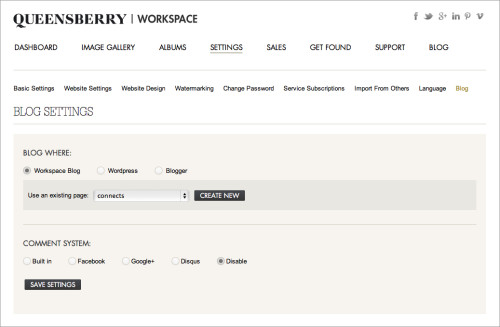
The new Workspace blogging feature allows you to set up a blog as part of your Workspace website OR send blog posts directly to your Blogger or Wordpress (self hosted) blog. This is a really useful feature as once you've uploaded and sorted images in Workspace, you can immediately post them as a slideshow or storyboard on your blog - making the Workspace workflow even smarter! It's a quick and easy way to get your images out in front of people online. Here's how it works (click on the images to view them larger): First you need to set up the blogging feature. You can do this under the SETTINGS To View More >>
This entry was posted in , by Admin

Pete and Ian have been blogging about colour management systems and how they help to ensure your image editing work delivers predictable colour and high-quality printing. But there's a lot to think about! Even the light you're working in can affect the results … or the clothes you're wearing, or the colour of your walls. So what could be easier? Getting us to do the work! Here's an incredibly simple new service, and a special offer: Batch Colour Correction by Queensberry in Lightroom. You can use our plugins, no matter where you are in the world, to send us DNG files from raw images you select To View More >>
This entry was posted in , , by Admin
Email: info@queensberry.com
Free Phone Numbers:
New Zealand: 0800 905 905
Australia: 1800 146 251
USA: +18668350851
UK: 0800 808 5271
Canada: +1 855 581 0370