

Blog
Welcome


Recent posts
SEARCH RESULTS FOR: Tutorial
Hey! It’s Charlotte from the customer service team 😊 One of the most common questions I get is “how do I create custom embossings?” so I’ve put together a super simple Canva tutorial to help you out! Why Canva? Canva is an easy-to-use online design tool that makes design accessible to everyone —no need for complex software like Illustrator! With a library full of modern fonts and illustrations, your ability to create beautiful, custom embossing designs for your clients is endless. 1) Gather Inspiration Start by heading to Pinterest to collect inspiration for your To View More >>


If you build your business on In-Person Sales, you have a huge advantage over competitors who can't — or won't — do the same. Online is great to get your name out there, great to sell prints to friends and family, fantastic for high volume, low price print sales … but, for high-end sales, getting face-to-face with your clients, in your studio, is best. In future posts, we'll talk more about sales strategies. This post is just about the benefits of buying Studio Boxes in bulk, by which we mean carrying your own stock of mats and boxes in To View More >>
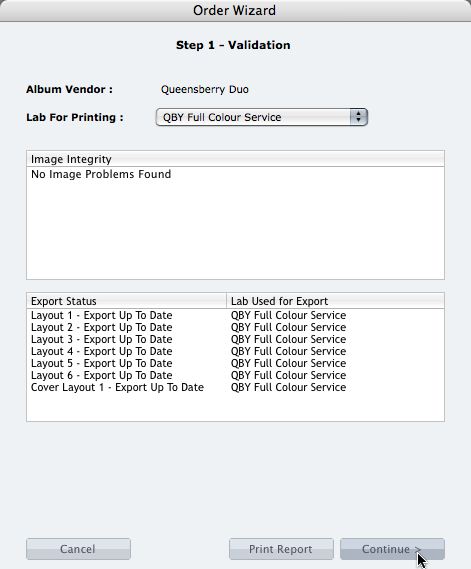
We're describing the perfect way to send us your print-and-bind order... After exporting your files you definitely shouldn't jump straight to LabFTP and send us the files - we wouldn't know what to do with them! Instead, always use the Remix Order Wizard. (You'll find it under the Album menu). Remix will validate your order and create an order "bundle" that contains everything we'll need to process your order - provided you follow these instructions: 1. Run your order through the Send Order Wizard. You'll find a tutorial here. The Wizard will ask what service you want (eg Print & Assemble) To View More >>
Email: info@queensberry.com
Free Phone Numbers:
New Zealand: 0800 905 905
Australia: 1800 146 251
USA: +18668350851
UK: 0800 808 5271
Canada: +1 855 581 0370