Blog
Welcome


Recent posts
SEARCH RESULTS FOR: Remix

Mac OSX Lion is exciting new software, but before you install it there are a few things to think about: 1. You'll lose access to all your old PowerPC applications. It's been six years since Apple transitioned to Intel processors, and with the introduction of OSX Lion you will no longer be able to run PowerPC based software. Rosetta kept the old software running pretty smoothly, so you could be in for a few surprises. For starters I had to upgrade Microsoft Office. Never thought of that! 2. Closer to home, you will no longer be able to run Photojunction Retro (yes, there are still a handful of To View More >>
This entry was posted in by Admin

Some of you have noticed that our recently discontinued cover materials have disappeared from PJ Remix, and asked what's going on. Fair enough too. We haven't been as clear about it as we should, and we apologise for not explaining this earlier. Although some cover materials have gone from PJ Remix, it doesn't necessarily mean we can't supply them. In fact our policy is, if possible, to make them available for two years after removing them from our swatch book. So how do you order them in PJ Remix? It's fairly simple... 1) Choose 'Other' in the Cover Material options. 2) Then click 'Add Note' and To View More >>
This entry was posted in by Admin

How do you know what size and shape to make an album cover image? How do you account for the aspect ratio and cover wrap-around (the part of the image you can't see)? If it sounds hard, it's not. Just design the cover in PJ Remix. It's exactly like designing pages only easier. You can see the aspect ratio and the wrap-around. And problems rarely occur because it's so obvious when images don't fit. We've already blogged about album covers, especially here and here, so we won't repeat ourselves. If you're not sure how to send us the image there's a link about that too. To View More >>
This entry was posted in by Admin
The purpose of our recent survey was to get a better picture of how you're using the software, and the features most important to you. It turns out you use Photojunction to design albums for almost a hundred album suppliers that we don't even offer resources for - no wonder a third of you "always" use Remix DIY! It's also clear that unless you're one of Queensberry's clients you're most likely using PJ primarily to design and export page layouts. That's not so surprising. Getting past "page design" requires a lot of input from vendors, and unfortunately they're much less engaged with PJ than their To View More >>
This entry was posted in by Admin
You probably know we offer free protective coating on all Queensberry prints bound in Queensberry albums. It's a fine, almost unnoticeable coating, that helps protect the images. Prints in Duo albums are a bit more exposed than in matted books, so we’ve decided to coat all prints bound into Duo albums from now on. Free of charge, obviously. As most of our clients already ask for their prints to be coated, this change will affect only a few clients. The change will be reflected automatically in Photojunction's smart filtering system in the next release, due out soon. If you'd like more information To View More >>
This entry was posted in by Admin
Wading through our "how-to" posts was quite a job. Trying to single out the best was just as difficult, but worth the effort. Here are my favourites. Hopefully you'll find them handy when dealing with Queensberry and Photojunction, and evaluating your own workflow... There's so much good stuff in the Smooth Sailing series I reckon you should check them all, but here are a few: Photo Front covers (easy peasy) - If designing Photo Front covers sounds hard. It's not. Here's how to easily do it. What can delay your orders? - Here are a few simple things that frequently delay people's orders (long To View More >>
This entry was posted in by Admin

We know the feeling – you know there must be a way to do something, but you just can't figure it out. Here's an example: there's no standard "title" aperture in PJ Remix, so how do you add a title? There are actually two ways to do it. The easier way (but maybe also easier to get wrong) is simply this: Add a blank aperture to the layout using the Add button (left image, above) Change the aperture to Customise (right image, above) Uncheck the Constrain Proportions box and enter the values directly. Easy as long as you remember the values: 112 wide by 200 high , as above. Whether you use To View More >>
This entry was posted in by Admin
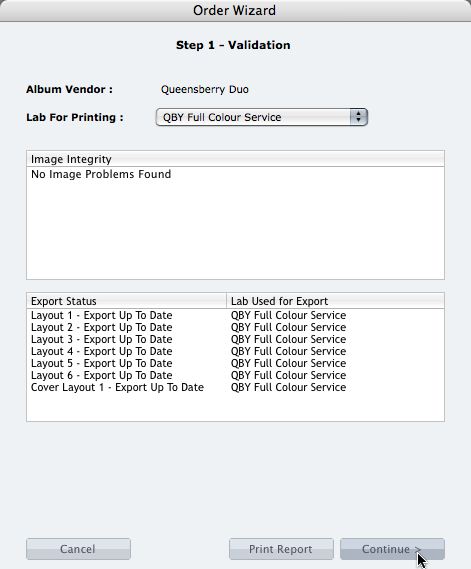
We're describing the perfect way to send us your print-and-bind order... After exporting your files you definitely shouldn't jump straight to LabFTP and send us the files - we wouldn't know what to do with them! Instead, always use the Remix Order Wizard. (You'll find it under the Album menu). Remix will validate your order and create an order "bundle" that contains everything we'll need to process your order - provided you follow these instructions: 1. Run your order through the Send Order Wizard. You'll find a tutorial here. The Wizard will ask what service you want (eg Print & Assemble) To View More >>
This entry was posted in by Admin
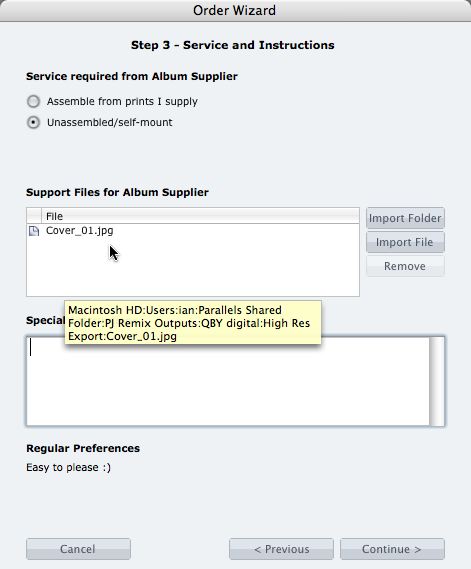
What if you want us to print your cover image, but nothing else? 1. When you fire up the Remix Order Wizard , choose either the "Assemble From Prints Supplied" or Don't Assemble" option. 2. On the same screen the Wizard will offer a place to include "support files" for your album supplier. Open your folder of High-Res Export files and drag in a copy of the cover image (don't double up by sending it to your lab to print as well). 3. Remix may ask you if you want us to print the cover image (generally it'll be obvious what you want, in which case Remix won't ask). Be sure to say Yes. 4. When the To View More >>
This entry was posted in by Admin

Cover layout design in PJ Remix Here are the first steps in preparing a perfect, hassle-free print-and-bind order, really fast. 1. First, upgrade to PJ Remix. If you have already, thank you. 2. Use Remix to design your cover as well as your page layouts. You'll get to frame and crop the cover image yourself, see exactly what it looks like and be sure that it looks good. For example, here you can see how much of the image in the photo front cover layout above has been cropped away. No problem in this case, but many images won't be suitable: 3. Export your cover AND page layouts using Remix's Export To View More >>
This entry was posted in by Admin