Blog
Welcome


Recent posts
SEARCH RESULTS FOR: Remix

When your first ever album order catches Queensberry’s eye you’ve got to be pretty pleased with yourself. Especially when you designed it in a program you’ve never used before. Keryn Sweeney of Keryn Maree Photographer recently opened her studio in Auckland, New Zealand, and shot and designed this little gem as a studio sample for the beauty side of her business - an area she’s had plenty of experience in. Keryn recognises the benefits of offering her clients albums, but although she'd come from a well-established beauty and glamour studio she'd never used them before. When it came to choosing To View More >>
This entry was posted in Uncategorized by Admin
Photojunction ran an interesting post a day or two ago. Danny referenced a report from theweddingreport.com that spending on wedding photography in the US may be in decline. It prompted Sonya to mention anecdotal reports that UK photographers, also, may be in for a rough ride for a while – bookings down etc. Yes, times may be tougher next year. If they get tough for you, we’re concerned and sympathetic. Bad stuff happens in business, and if you’re affected, we are too. But... Don’t sabotage your long-term business in order to survive! What do I mean? Queensberry has always stressed the To View More >>
This entry was posted in by Admin
We reckon it's time to upgrade to PJ Remix. The guys at Team PJ haven't gone final yet, but they must be getting close. Talia from our design department loves it: "Yay for Remix! I've been doing a heap of digital album exports lately and I use a lot of non standard sizes in digital albums. Using Remix I don't need to make any adjustments to the alignment in Photoshop because PJ is now spot on! So much time being saved!" Talia had been holding off because the QuickTime movie function was "too slow", but now that's fixed there's no holding her back. So you know, you can move from PJ Retro to Remix To View More >>
This entry was posted in by Admin
We owe a big thank you to all the people who completed our survey recently. We had a great response, and we thought you'd like to know the outcome. There were two major surprises, as you'll see. 1. We listed all the vendors whose resources we distribute, and asked you to tell us which companies you use. People named an average of two companies each, and some people named several. 2. Over a third named Queensberry as one of their suppliers, but the first big surprise was that 40% of respondents wrote in the name of a company whose resources we don't offer. In fact we discovered that PJ is used to To View More >>
This entry was posted in by Admin

[caption id="attachment_4040" align="alignleft" width="226" caption="Photo by: Kamila Harris Photography"][/caption] Hi! My name is Angelique Buckley, and I am the newest member of the Photojunction Support Team. If you are an avid reader of The Junction like I am, you may have already heard of me. I've been featured on the blog four times already, and can't wait to play a bigger role in the growth of Photojunction. So a little background about me... I am a huge nerd and I love photography. Maybe that's why I fit in so well into the Queensberry team? I studied Graphic Design in school, minoring To View More >>
This entry was posted in by Admin
Psst... Photojunction's just snuck out another beta release, 1.39b! I feel like we say this every time we blog about a new release, but it's another biggie. There's way too much new PJ goodness in 1.39b to show you in one post, so keep tuned for our next series of 1.39b feature posts over the next couple of weeks. Before we go though, here's a little of what to expect in 1.39b... Work's been done to improve the Alignment features (Smart centering in particular), we've changed the way templates operate (for the better), and we've given you even more control by adding a few new features to the Preferences To View More >>
This entry was posted in by Admin
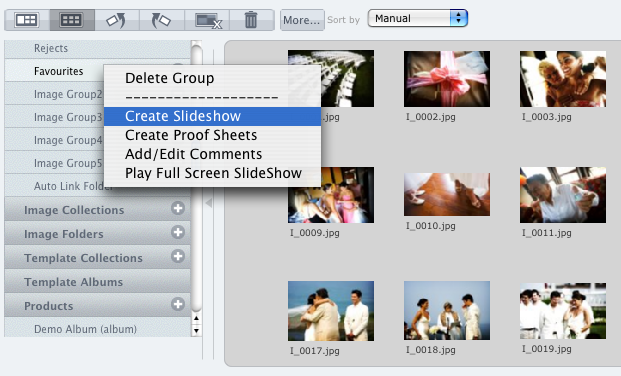
Photojunction's Slideshow creator might not be the most full featured app out there, but it's certainly one of the quickest and it outputs the smallest file size around. Same deal as Proof Sheets. Right click on the Group or Collection you want to create the slideshow from, and select 'Create Slideshow'. Or take the long way round... Create a new product and select Slideshow from the Project Setup window. Otherwise, you can also right-click on any layout in the Preview window and select 'Create Slideshow'. Here's a couple of previous posts about Remix's slideshow feature... Remix's Slideshow feature To View More >>
This entry was posted in by Admin
If you’re still using Photojunction Retro, an updated set of album resources has been released to reflect Queensberry’s new season range. These include new album formats and cover materials, and updated personalised title and cover options. You’ll need to download these resources so you can order the new products – and also to ensure that the orders you send us are accurate, complete and comply with our requirements. If you haven't done so already, now may be the time to upgrade to PJ Remix. Then you won’t have to worry about updating your resources as Remix does it automatically (provided To View More >>
This entry was posted in by Admin
The best album design software is now free to all. The Directors of Queensberry and Photojunction are delighted to announce a major change of direction for Photojunction. Effective immediately PJ Remix is a free download for photographers everywhere. This is great news for Queensberry clients in particular as it means developing a dedicated, intuitive, hassle-free Queensberry workflow will be a top priority. You can read the full announcement on The Junction. Best wishes from the Queensberry Client Support Team To View More >>
This entry was posted in by Admin
This post has been superseded by new Photojunction functionality. PJ Remix's Order Wizard saves "Bundles" (folders) of files to your hard disk ready for you to upload them to your album supplier and/or lab. But Remix itself doesn't do the upload. Queensberry does that with LabFTP. Somethimes confusion arises around two points: 1. Occasionally users think they're done once they've run through the Order Wizard. Not so. All you've done is email us to expect an order. You still need to upload the files. 2. Occasionally a photographer will open the bundle, take out what (s)he thinks we need and uploaded To View More >>
This entry was posted in by Admin