

Blog
Welcome


Recent posts
SEARCH RESULTS FOR: LabFTP
We're working hard on systems to make designing, ordering and printing your albums easier. The latest thing we've done is commission PJ to add some features to Remix just for us. They’re in the latest final release - v1.2 - and they’re awesome: “Smart filtering” to avoid invalid selections when you order an album. A simpler version of LabFTP to use with Remix – no asking dumb questions when PJ already knows the answers. Dramatically better handling of Duo albums (here’s a movie , but really, it’s so simple you probably don’t need it). Remix now handles “cut-in” apertures! To View More >>

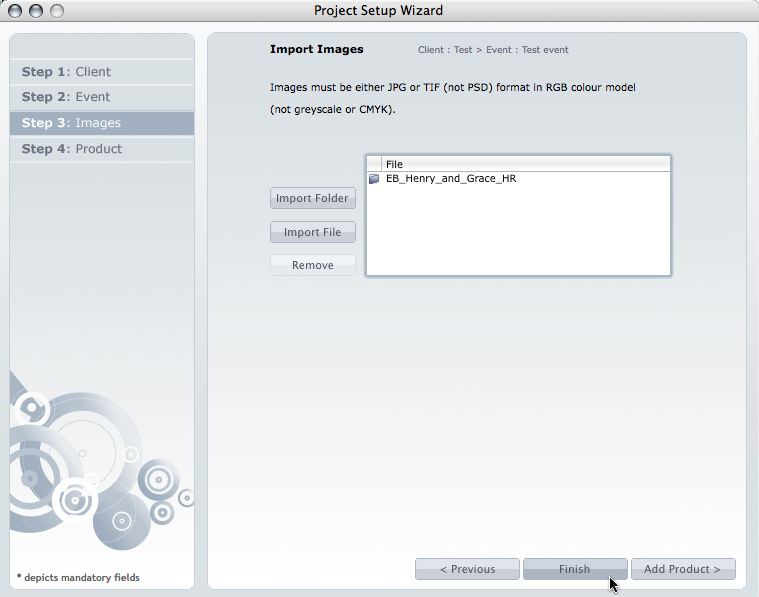
This post is now superseded by new functionality in Photojunction v1.22 and later). If you use Queensberry to design your albums we want to make the process as smooth as possible. Here’s how to go about it. (The PJ work sounds more complicated than it is, but we’re here to help if you need it. Follow the links for further information.) 1. Open up PJ Remix and click the Start New Project button. This fires up the Project Set-up Wizard for you to enter your Client and Event details and import the images. 2. Click Finish when you're done setting up the Project. Remix will import the images and To View More >>
The latest PJ Remix beta was released last week. Here are links to three great new features: the ability to add text to layouts, the ability to import PSDs as images (instead of JPEGs) and templates, and a function to create proof sheets. Plus all the usual tweaks and fixes! Here's another one Queensberry users will like - you no longer need LabFTP to upload your orders. It all happens within Photojunction itself. The software even talks to our server and assigns a Queensberry reference to your order. If you'd like to try the new version but aren't set up to get beta updates, here's what to do. To View More >>
Wading through our "how-to" posts was quite a job. Trying to single out the best was just as difficult, but worth the effort. Here are my favourites. Hopefully you'll find them handy when dealing with Queensberry and Photojunction, and evaluating your own workflow... There's so much good stuff in the Smooth Sailing series I reckon you should check them all, but here are a few: Photo Front covers (easy peasy) - If designing Photo Front covers sounds hard. It's not. Here's how to easily do it. What can delay your orders? - Here are a few simple things that frequently delay people's orders (long To View More >>
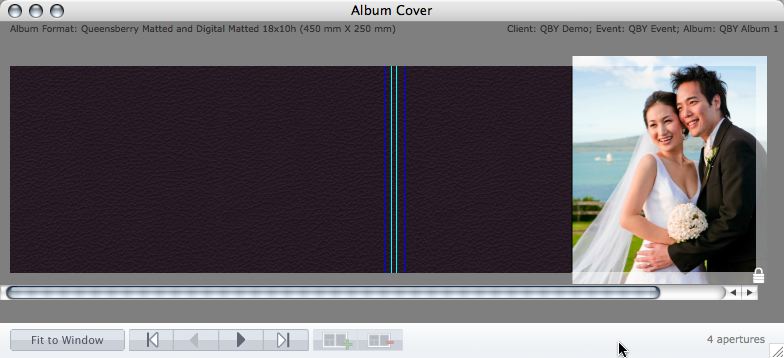
Cover layout design in PJ Remix Here are the first steps in preparing a perfect, hassle-free print-and-bind order, really fast. 1. First, upgrade to PJ Remix. If you have already, thank you. 2. Use Remix to design your cover as well as your page layouts. You'll get to frame and crop the cover image yourself, see exactly what it looks like and be sure that it looks good. For example, here you can see how much of the image in the photo front cover layout above has been cropped away. No problem in this case, but many images won't be suitable: 3. Export your cover AND page layouts using Remix's Export To View More >>
Email: info@queensberry.com
Free Phone Numbers:
New Zealand: 0800 905 905
Australia: 1800 146 251
USA: +18668350851
UK: 0800 808 5271
Canada: +1 855 581 0370