Blog
Welcome


Recent posts
SEARCH RESULTS FOR: Cover Image

If you're thinking about adding spice to your packages, consider Designable Q Books. Great for portraits, pets, engagement and much more. Here are a few reasons why your clients will love them as much as we do, and how to encourage profitable product sales from your next shoot! Personalisation at every point All Queensberry products can be personalised, but add a Designable cover and thinner pages, and the options are endless. With their image on the cover, their book will be one of a kind. And you have five standard templates to choose from. More photos To View More >>
This entry was posted in by Victoria Hollings

A personal website for your clients, with your photography, your client's album design, a gift registry, a guest book, a link to your own site… oh, and a shopping cart! In just a few minutes you can create a beautiful-looking site that your clients will find appealing and useful, that provides a convenient way to interact with them about their album, and that helps spread the word about you, while encouraging some nice add-on sales from friends and family. Workspace has three new and improved designs that reflect our web themes, are mobile responsive, and are just as easy To View More >>
This entry was posted in by Alexandria Baugh

There’s lots to like in our new Workspace Image Galleries: stunning full bleed feature images, no-fuss emails you can personalise and style, redesigned login windows, image favouriting and updated slideshows. Read on for details... Auto-generated Emails: Your image gallery titles and passwords, and your company name and social media links, are all included in auto-generated client emails that you can personalise and style. Simple, clean and best of all, no fuss. New login window: Semi-private galleries are just that. Unless people have the password, all they can see is your chosen feature To View More >>
This entry was posted in by Alexandria Baugh

How do you know what size and shape to make an album cover image? How do you account for the aspect ratio and cover wrap-around (the part of the image you can't see)? If it sounds hard, it's not. Just design the cover in PJ Remix. It's exactly like designing pages only easier. You can see the aspect ratio and the wrap-around. And problems rarely occur because it's so obvious when images don't fit. We've already blogged about album covers, especially here and here, so we won't repeat ourselves. If you're not sure how to send us the image there's a link about that too. To View More >>
This entry was posted in by Admin
Wading through our "how-to" posts was quite a job. Trying to single out the best was just as difficult, but worth the effort. Here are my favourites. Hopefully you'll find them handy when dealing with Queensberry and Photojunction, and evaluating your own workflow... There's so much good stuff in the Smooth Sailing series I reckon you should check them all, but here are a few: Photo Front covers (easy peasy) - If designing Photo Front covers sounds hard. It's not. Here's how to easily do it. What can delay your orders? - Here are a few simple things that frequently delay people's orders (long To View More >>
This entry was posted in by Admin
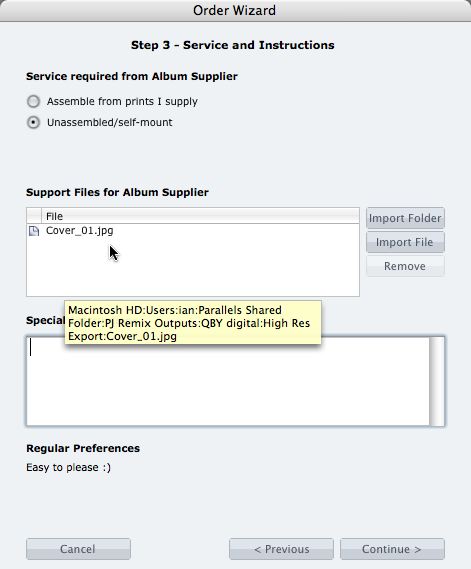
What if you want us to print your cover image, but nothing else? 1. When you fire up the Remix Order Wizard , choose either the "Assemble From Prints Supplied" or Don't Assemble" option. 2. On the same screen the Wizard will offer a place to include "support files" for your album supplier. Open your folder of High-Res Export files and drag in a copy of the cover image (don't double up by sending it to your lab to print as well). 3. Remix may ask you if you want us to print the cover image (generally it'll be obvious what you want, in which case Remix won't ask). Be sure to say Yes. 4. When the To View More >>
This entry was posted in by Admin

Cover layout design in PJ Remix Here are the first steps in preparing a perfect, hassle-free print-and-bind order, really fast. 1. First, upgrade to PJ Remix. If you have already, thank you. 2. Use Remix to design your cover as well as your page layouts. You'll get to frame and crop the cover image yourself, see exactly what it looks like and be sure that it looks good. For example, here you can see how much of the image in the photo front cover layout above has been cropped away. No problem in this case, but many images won't be suitable: 3. Export your cover AND page layouts using Remix's Export To View More >>
This entry was posted in by Admin

It seems a long way from Brian Dorsey's TriBeCa studio to a pumpkin field in New Jersey, but then his clients have commissioned him for events everywhere from Anguilla to Acapulco, and Quebec to Rio. What caught our eye about this very striking album was how Brian had reflected his client's tastes in it. Cindy and Eric were married in October, and the bride's favourite colour is orange – so think Halloween and harvest time, pumpkins, trees changing colour with the Fall... and all matched harmoniously with the striking autumnal cover image, the matching leather binding, the chocolate-on-ivory To View More >>
This entry was posted in by Admin
We've been talking a lot about smooth sailing lately, with two goals in mind. For you, an efficient and easy-to-use system. And for us, an order that's accurate, error-free and ready to go straight into production. Fair to say then, that it's in both of our interest to sail through the ordering and production process as quickly as possible. But when your order doesn't sail through - what holds it up? Here are a few simple things that we've found to be the most common cause of delays (long delays in some cases). 1) Missing print files (cover images) are the most common - people just forget to include To View More >>
This entry was posted in by Admin

Remix Final 1.30 is the combination of six months hard work, four beta releases and invaluable feedback from our loyal community... It's the most comprehensive, intuitive and effective version of Photojunction Remix we’ ve ever released. We hope you’ ll think so too. But first up, here's a quick review of the major features first released in the beta releases since 1.25. Remix beta 1.26: A feature packed release which included text functionality , importing PSD ’ s as templates and images, and proof sheets . Remix beta 1.27: The game changer - new interface, managed workflow and built To View More >>
This entry was posted in by Admin