Blog
Welcome


Recent posts
SEARCH RESULTS FOR: Photojunction
Turns out there's a certain stigma attached to the word 'free'. Take a conversation I overheard this morning. A photographer was talking about how they really like the look of Photojunction but was avoiding downloading because, quote, "Although it says free, nothing is ever free." This conversation reminded me of a post Ian wrote about this time last year titled, "F.r.e.e". In light of this morning's conversation, I thought I'd resurrect part of it which explains why we give Photojunction away free, and why there's no catch... So… why? What’s the catch? Well, we’re building a community To View More >>
This entry was posted in by Admin

Photojunction's integration with albumexposure just keeps getting better. albumexposure now offers you the ability add music to accompany a client's album design, from within Photojunction. Just select the 'Proof with albumexposure' option from the Album menu in Photojunction, then on the AE start screen, choose the 'Upload Music file' option from the 'Select Song' drop down list. Cheers, Nigel PS music files need to be in MP3 format. To View More >>
This entry was posted in by Admin
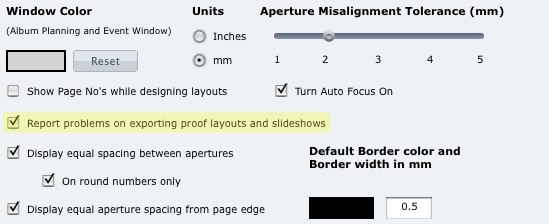
You can now choose in the Photojunction Preferences to have the Problem Reporter report on any problems in your album design when you create a slideshow or proof sheets from it. Why's that useful? Well you'll need any problems fixed before you order the album, so if you're going to create a slideshow or proof sheets of it, you can be sure they're perfect too, and exactly as per the album. This option is set on as a default but you can turn it off by heading to the Preferences and unchecking 'Report problems on exporting proof layouts and slideshows'. Easy. Cheers, Nigel To View More >>
This entry was posted in by Admin
As regular users will know, our new final v1.40 is now out in the wild. If you don’t use the Betas we think you’re in for a treat. As with all our Finals, it's a combination of features from the past two beta releases, 1.38b and 1.39b, but this time we also added two important changes that only affect Queensberry clients. We've blogged about them already on Queensberry Connects – a few controls about the use of Panoramas in matted albums and some changes to the QBY Upload Order process. We'll talk about a few juicy features we haven't covered yet over the next few days, but here are a few To View More >>
This entry was posted in by Admin

Jerry Tomko is a long time friend who comes to mind whenever we think of heavy Photojunction users. He designs and sells a huge number of albums each year and has been using the software for as long as we can remember. 1) What impact does Photojunction have on your album design workflow? Photojunction has had a huge impact on my album design workflow. I have always been a firm believer in predesign - and in wedding albums, and I truly believe you should be able to see what you are purchasing. Even back in the film days, I would always present to the client what the album would look like before To View More >>
This entry was posted in Uncategorized by Admin

[caption id="attachment_7717" align="alignnone" width="500" caption="Click to view image full-size"][/caption] It's been said that the first rule of online social media is, Invest your time, not your money. Which is why it's so hard to do. Let's face it – who has the time? So how about a marketing opportunity that requires just a button-click? We've just snuck (if that's a word) a new feature into Queensberry's Photojunction Resources, and judging by the emails already coming in it's going to be a popular idea. If we're printing and assembling your album, you'll see a question asking if you'd To View More >>
This entry was posted in by Admin

All you need to know about Photojunction's upcoming webinars is now in one tidy place. Here. On our Photojunction Webinar Schedule page. We'll keep this schedule regularly updated with the latest times, dates, info and registration details about our upcoming webinars. Most of them are free to attend so whether you're a new Photojunction convert and in need of our Intro to Photojunction webinar, or an experienced PJ beta tester wanting to spend some quality time with us in our pure Q&A webinar - you'll find all the details on the schedule page. The handy button to the right will take you To View More >>
This entry was posted in by Admin
This week's webinar is our 'Intro to Photojunction' presentation taking place right here (online) on Thursday 27 May @ 9am (NZT). In this webinar Danny will show you how to fire up the software and start using it. He’ll also walk you through everything from registering, to designing an album, to exporting and sending. As always, it’s free to attend and everyone’s welcome. Click here to register See you there! Cheers, Nigel PS Thursday 27 May @ 9am NZT time means: AUSTRALIA – Thursday 27 May 7:00 AM NEW ZEALAND – Thursday 27 May 9:00 AM UK – Wednesday 26 May 10:00 PM USA (West Coast) To View More >>
This entry was posted in by Admin

It's been a while, but this year Photojunction and Queensberry are returning to PMA's Digital Life Expo in Melbourne, Australia. If you're attending the show we'd love you to drop by and say hi. We'll be there with the Queensberry team who will have an impressive bunch of new albums with them including their newly released Musée album, so make sure you come and check them out too. The details: PMA Digital Life Expo: 4-6 June 2010 Melbourne Exhibition and Convention Center, Melbourne @ Stand # 450 See you there! Cheers, Danny PS Pre-register online here and gain free entry to the exhibition and To View More >>
This entry was posted in by Admin
Got a Photojunction question bugging you? Then come along to our pure Question and Answer webinar tomorrow... Danny, Christine and I are yours for an hour! We'll be answering your questions live throughout the hour, but if you'd like to submit a question early, send it to nigel@queensberry.com and we'll do our best to cover it. It's free to attend and everyone's welcome, so join us tomorrow - Thursday 20 May @ 9am (NZT) Click here to register See you tomorrow loaded with questions! Cheers, Nigel PS Thursday 20 May @ 9am NZT time means: AUSTRALIA – Thursday 20th May 7:00 AM NEW ZEALAND – Thursday To View More >>
This entry was posted in by Admin