

Blog
Welcome


Recent posts
SEARCH RESULTS FOR: Photojunction Retro
We are about to release a new version of Photojunction that will no longer support Macintosh pre-Intel PowerPCs, which were discontinued in 2006. This is necessary so that we can upgrade the Photojunction development environment, which no longer supports PowerPCs. If you are running a Windows PC you won't be affected. If you're running an Intel-based Mac you won't be affected either. All Macs have been Intel-based since 2007, so if your computer is newer than that you're fine. If you're not sure you can check by going to About This Mac under the Apple menu. We have announced that this is coming To View More >>
This entry was posted in by Admin
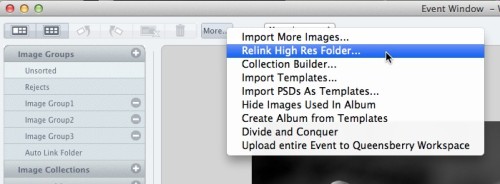
Warning: Your high-res files are missing! At one stage or another in your relationship with Photojunction I'm sure you've encountered this warning. If it was a popularity contest it would end up below car salesmen, cold callers and politicians. But love it (nobody) or hate it (everybody) it's there for a good reason. Photojunction travels along paths. It follows those paths to locate, use and update the proxy images, hi res files and exports created as you work. The rules are simple. If you don't move, rename or delete your files and folders, Photojunction will find them. But life isn't simple, To View More >>
This entry was posted in by Admin
We sincerely apologise to those of you that have been affected by the current errors occuring when designing Flushmount albums in Photojunction. For those of you that wish to have a full bleed image on the page after a translucent title you will be encountering an error that stops you from proceeding. We are aware of the problem and are working on a solution in Photojunction. In the meantime we have two options for getting around this issue: • Either drop the image onto the layout and physically drag the image to the edges or; • Instead of selecting the title option, leave a note in the special To View More >>
This entry was posted in , by Admin
Everyone has a different workflow, there's no question about it. Most wedding photographers have a shooting season and…the rest of the year. Depending on your clients, album design could be year round, but if you're lucky, you finish your album season shortly after your shooting season. The "downtime" is used for maintaining your business, small shoots, networking, and maybe taking it easier. One of the most important things to take care of during this time is organizing and backing up files. I 'm afraid album files get forgotten sometimes. I can't stress enough, you should back up your files. To View More >>
This entry was posted in by Admin
Hi Guys, I have been having a few "GoToMeeting" video calls with clients recently and if I was going to comment about anything it would be how we manage files. There is a wide variety of ways people set up and work with their files, and sometimes they lead to confusion and frustration. Here's the first of a couple of posts that will help. ;) Place your files somewhere safe. Your desktop may not be the best place to save files, because you may have a tidy up and delete something that you may want to retain, at least until you get your album back. On the flip side you don't want to bury them deep To View More >>
This entry was posted in by Admin
Remember the very first time you sent a letter? (Or for those who have never posted a letter - sent an email?) There were doubts - would it get there? Would strangers look at it in transit? Did I have enough postage? Did I have the right address? Do I trust the postie to take great care of my efforts? The same goes with sending orders to Queensberry through Photojunction for the first time. We need assurances that I know, as a very regular user, become less relevant with experience. Photojunction has many 'safety' features to prevent people from mucking up their orders. These safety features exist To View More >>
This entry was posted in by Admin

I'm a bit obsessed with clearing my problem reporter. When I do, I know I did my best to make the album perfect production-wise. When we did the Problem Reporter Webinar, Ian had a list of the different errors that could come up. I like to think of it as a cheat sheet for questions Photojunction users might have for me. The most common one I hear is missing HR files. If you are receiving this message, it means that Photojunction doesn't know where your High Res images are. They may have been moved or the path could have been renamed. In the Event Window, click the More button, select "Relink High To View More >>
This entry was posted in by Admin
From v1.46 onwards, Photojunction will automatically install Queensberry's colour profiles for both our silver halide Lab and our digital-offset press books. To use them you just need to add them to your soft-proofing set-up (in Photoshop, it's at View / Proof Setup – and if you're unclear about it, the process is described in our knowledge base): However, this new system wasn't available before Photojunction version 1.46. That means, if you've designed and exported a Press Book using v1.45 recently, but not sent it yet, we suggest you re-export the album using v1.46 before hitting the send button. To View More >>
This entry was posted in by Admin
Wading through our "how-to" posts was quite a job. Trying to single out the best was just as difficult, but worth the effort. Here are my favourites. Hopefully you'll find them handy when dealing with Queensberry and Photojunction, and evaluating your own workflow... There's so much good stuff in the Smooth Sailing series I reckon you should check them all, but here are a few: Photo Front covers (easy peasy) - If designing Photo Front covers sounds hard. It's not. Here's how to easily do it. What can delay your orders? - Here are a few simple things that frequently delay people's orders (long To View More >>
This entry was posted in by Admin
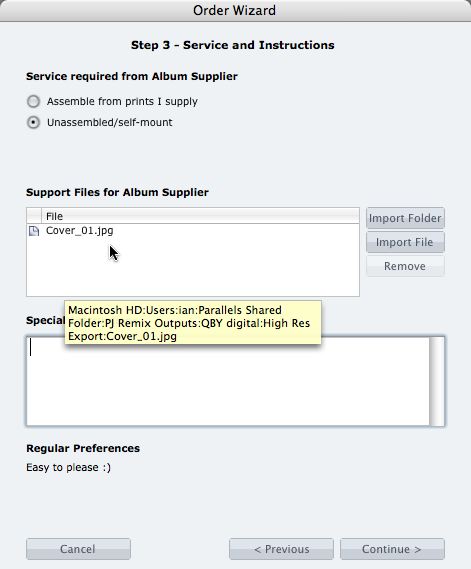
What if you want us to print your cover image, but nothing else? 1. When you fire up the Remix Order Wizard , choose either the "Assemble From Prints Supplied" or Don't Assemble" option. 2. On the same screen the Wizard will offer a place to include "support files" for your album supplier. Open your folder of High-Res Export files and drag in a copy of the cover image (don't double up by sending it to your lab to print as well). 3. Remix may ask you if you want us to print the cover image (generally it'll be obvious what you want, in which case Remix won't ask). Be sure to say Yes. 4. When the To View More >>
This entry was posted in by Admin
Email: info@queensberry.com
Free Phone Numbers:
New Zealand: 0800 905 905
Australia: 1800 146 251
USA: +18668350851
UK: 0800 808 5271
Canada: +1 855 581 0370