

Blog
Welcome


Recent posts
SEARCH RESULTS FOR: Photojunction Remix
We are about to release a new version of Photojunction that will no longer support Macintosh pre-Intel PowerPCs, which were discontinued in 2006. This is necessary so that we can upgrade the Photojunction development environment, which no longer supports PowerPCs. If you are running a Windows PC you won't be affected. If you're running an Intel-based Mac you won't be affected either. All Macs have been Intel-based since 2007, so if your computer is newer than that you're fine. If you're not sure you can check by going to About This Mac under the Apple menu. We have announced that this is coming To View More >>
This entry was posted in by Admin
Warning: Your high-res files are missing! At one stage or another in your relationship with Photojunction I'm sure you've encountered this warning. If it was a popularity contest it would end up below car salesmen, cold callers and politicians. But love it (nobody) or hate it (everybody) it's there for a good reason. Photojunction travels along paths. It follows those paths to locate, use and update the proxy images, hi res files and exports created as you work. The rules are simple. If you don't move, rename or delete your files and folders, Photojunction will find them. But life isn't simple, To View More >>
This entry was posted in by Admin
Things have a habit of creeping up on you, as our friends at Seldex have reminded us by sending an email to their clients reminding them that come July they won't be able to use Photojunction's cover design and Send Order functions. (We announced as much here back in February.) We've counted Seldex as friends for years – in fact they sold Queensberry albums in Australia back in the day! - so this is a rather sad time, the culmination of a process that started to unfold a couple of years ago when we realised that most suppliers weren't going to support PJ as a universal album design tool, which To View More >>
This entry was posted in by Admin
Hi Guys, I have been having a few "GoToMeeting" video calls with clients recently and if I was going to comment about anything it would be how we manage files. There is a wide variety of ways people set up and work with their files, and sometimes they lead to confusion and frustration. Here's the first of a couple of posts that will help. ;) Place your files somewhere safe. Your desktop may not be the best place to save files, because you may have a tidy up and delete something that you may want to retain, at least until you get your album back. On the flip side you don't want to bury them deep To View More >>
This entry was posted in by Admin
Having worked on the Photojunction help desk for the last six weeks I have had a very good chance to look more closely at this great piece of software. I have seen the problems people have with it. The problems fall into three categories ... The software, the user, the computer. The software is good. Actually it is really good. It's not perfect, but with every iteration it gets better, and if it was ever perfect the developers would be out of a job. It has weaknesses but they are outweighed by its strengths. It could never be perfect because it is constantly evolving to meet the needs of a changing To View More >>
This entry was posted in by Admin
By default Photojunction keeps its main database and your template and project files in a folder called "Photojunction" on your computer. You can move the folder to a new location, but by default you'll find it here: Windows Vista and Windows 7: C:Program DataPhotojunction Windows XP: C:Document and SettingsAll UsersApplication DataPhotojunction Mac: Macintosh HD:Users:Shared:Photojunction: If you're shifting to a new computer, just move the ENTIRE FOLDER to the equivalent location on the new machine. Some people may have moved their PJ Project files (client/event/album data) to a different location. To View More >>
This entry was posted in by Admin
Danny's Last Day from Photojunction on Vimeo. Ian talks to Danny about successes and frustrations; wow features he wishes he'd plugged in the webinars; how to be a happy software user (any software); how and why PJ differs from layout programs like InDesign; and why you can depend on the PJ support and development teams. To View More >>
This entry was posted in by Admin
I have taken up a temporary position helping out with the Photojunction support team. One thing that I have noticed is that people seem to have more problems with the mechanics of Photojunction not fitting into their own experience or habits. Hardly ever does anybody ask for design advice. I wonder if it is the same with photography. People will ask about technical things like lighting and composition but much less often about content and emotion. ARE WE TOO SHY? I don't think so! As photographers we are called upon to be the creative voice for our clients. Is it that we don't like to ask for help? To View More >>
This entry was posted in by Admin

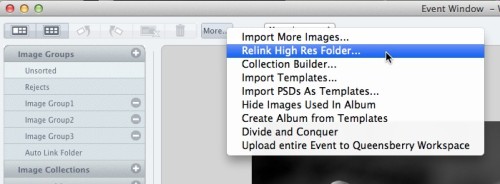
I'm a bit obsessed with clearing my problem reporter. When I do, I know I did my best to make the album perfect production-wise. When we did the Problem Reporter Webinar, Ian had a list of the different errors that could come up. I like to think of it as a cheat sheet for questions Photojunction users might have for me. The most common one I hear is missing HR files. If you are receiving this message, it means that Photojunction doesn't know where your High Res images are. They may have been moved or the path could have been renamed. In the Event Window, click the More button, select "Relink High To View More >>
This entry was posted in by Admin
From v1.46 onwards, Photojunction will automatically install Queensberry's colour profiles for both our silver halide Lab and our digital-offset press books. To use them you just need to add them to your soft-proofing set-up (in Photoshop, it's at View / Proof Setup – and if you're unclear about it, the process is described in our knowledge base): However, this new system wasn't available before Photojunction version 1.46. That means, if you've designed and exported a Press Book using v1.45 recently, but not sent it yet, we suggest you re-export the album using v1.46 before hitting the send button. To View More >>
This entry was posted in by Admin
Email: info@queensberry.com
Free Phone Numbers:
New Zealand: 0800 905 905
Australia: 1800 146 251
USA: +18668350851
UK: 0800 808 5271
Canada: +1 855 581 0370