Did you know you can sell Queensberry products directly through your Photo Galleries? Click here to learn more.

Blog

Welcome

This is the blog for professional photographers, and those who aspire to be. Our aim is to help professional photographers build long-term, sustainable careers.
loading facebook page

SEARCH RESULTS FOR: Export Wizard

A few clients have told us that they prefer to export their own printing files (page layouts) in Photojunction, but the "Export" button seems to have disappeared. So what have we done with it? Whether the Export button appears or not is dependent on whether you or we (Queensberry) are to do the exporting, and that depends on the option you choose in the Service dropdown menu during album set up. Looking at the screenshot, if you choose Print and Assemble you'll need to do the export - ie create the PSD layouts and, if need be, edit the files before you upload them to us. If you chose Export, Print To View More >>

This entry was posted in , by Queensberry Website | Leave a Comment

This post is now superseded by new functionality in Photojunction v1.22 and later). If you use Queensberry to design your albums we want to make the process as smooth as possible. Here’s how to go about it. (The PJ work sounds more complicated than it is, but we’re here to help if you need it. Follow the links for further information.) 1. Open up PJ Remix and click the Start New Project button. This fires up the Project Set-up Wizard for you to enter your Client and Event details and import the images. 2. Click Finish when you're done setting up the Project. Remix will import the images and To View More >>

This entry was posted in by Admin | Leave a Comment

As we announced back in February, we're in the process of streamlining the way Photojunction handles third-party vendors. As part of that process, we will tomorrow be removing the Cover Material, Cover Style, and Titles resources, as well as the largely unused “Send Order” functionality for all suppliers other than Queensberry. If you're using PJ to design Queensberry albums, or not using the functions listed above, you won't notice any difference. Only those designing for a handful of vendors are affected, and we understand that those most affected have been working through the transition To View More >>

This entry was posted in by Admin | Leave a Comment

All software evolves as new features are added and new versions released. Photojunction and Photoshop are no exception, and, as PJ takes advantage of more, often newer, features of Photoshop, its "backwards compatibility" with older versions is lessened. That's why we recommend that you use Photoshop CS3 or later with Photojunction. If you use CS2 or even earlier, chances are that it will work fine, but you may occasionally find that some PSD files don't import correctly as images or templates, or that you get error messages when exporting with PS scripting. If that happens, all Support can do To View More >>

This entry was posted in by Admin | Leave a Comment

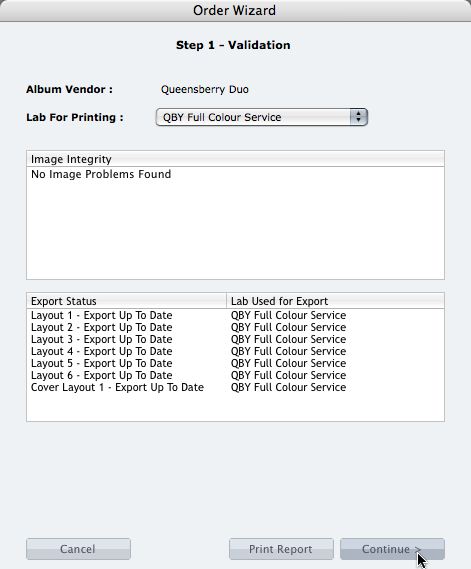
We're describing the perfect way to send us your print-and-bind order... After exporting your files you definitely shouldn't jump straight to LabFTP and send us the files - we wouldn't know what to do with them! Instead, always use the Remix Order Wizard. (You'll find it under the Album menu). Remix will validate your order and create an order "bundle" that contains everything we'll need to process your order - provided you follow these instructions: 1. Run your order through the Send Order Wizard. You'll find a tutorial here. The Wizard will ask what service you want (eg Print & Assemble) To View More >>

This entry was posted in by Admin | Leave a Comment