Blog
Welcome


Recent posts
SEARCH RESULTS FOR: Photojunction Remix

We know the feeling – you know there must be a way to do something, but you just can't figure it out. Here's an example: there's no standard "title" aperture in PJ Remix, so how do you add a title? There are actually two ways to do it. The easier way (but maybe also easier to get wrong) is simply this: Add a blank aperture to the layout using the Add button (left image, above) Change the aperture to Customise (right image, above) Uncheck the Constrain Proportions box and enter the values directly. Easy as long as you remember the values: 112 wide by 200 high , as above. Whether you use To View More >>
This entry was posted in by Admin
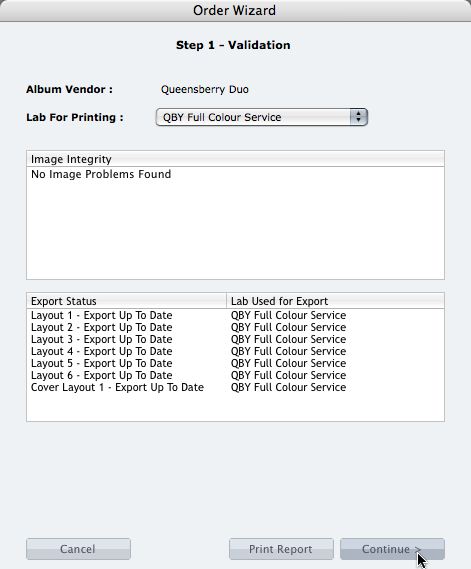
We're describing the perfect way to send us your print-and-bind order... After exporting your files you definitely shouldn't jump straight to LabFTP and send us the files - we wouldn't know what to do with them! Instead, always use the Remix Order Wizard. (You'll find it under the Album menu). Remix will validate your order and create an order "bundle" that contains everything we'll need to process your order - provided you follow these instructions: 1. Run your order through the Send Order Wizard. You'll find a tutorial here. The Wizard will ask what service you want (eg Print & Assemble) To View More >>
This entry was posted in by Admin
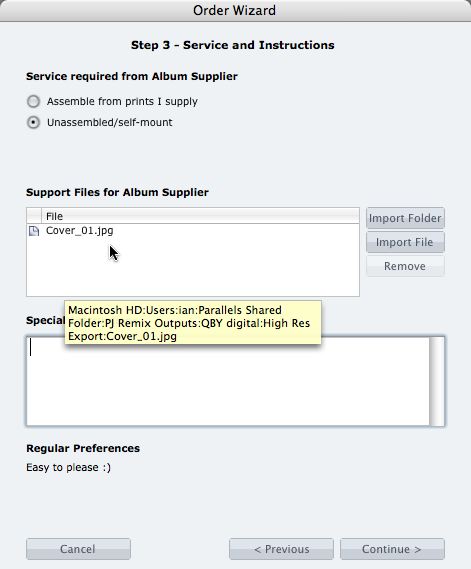
What if you want us to print your cover image, but nothing else? 1. When you fire up the Remix Order Wizard , choose either the "Assemble From Prints Supplied" or Don't Assemble" option. 2. On the same screen the Wizard will offer a place to include "support files" for your album supplier. Open your folder of High-Res Export files and drag in a copy of the cover image (don't double up by sending it to your lab to print as well). 3. Remix may ask you if you want us to print the cover image (generally it'll be obvious what you want, in which case Remix won't ask). Be sure to say Yes. 4. When the To View More >>
This entry was posted in by Admin

Cover layout design in PJ Remix Here are the first steps in preparing a perfect, hassle-free print-and-bind order, really fast. 1. First, upgrade to PJ Remix. If you have already, thank you. 2. Use Remix to design your cover as well as your page layouts. You'll get to frame and crop the cover image yourself, see exactly what it looks like and be sure that it looks good. For example, here you can see how much of the image in the photo front cover layout above has been cropped away. No problem in this case, but many images won't be suitable: 3. Export your cover AND page layouts using Remix's Export To View More >>
This entry was posted in by Admin

When your first ever album order catches Queensberry’s eye you’ve got to be pretty pleased with yourself. Especially when you designed it in a program you’ve never used before. Keryn Sweeney of Keryn Maree Photographer recently opened her studio in Auckland, New Zealand, and shot and designed this little gem as a studio sample for the beauty side of her business - an area she’s had plenty of experience in. Keryn recognises the benefits of offering her clients albums, but although she'd come from a well-established beauty and glamour studio she'd never used them before. When it came to choosing To View More >>
This entry was posted in Uncategorized by Admin
Photojunction ran an interesting post a day or two ago. Danny referenced a report from theweddingreport.com that spending on wedding photography in the US may be in decline. It prompted Sonya to mention anecdotal reports that UK photographers, also, may be in for a rough ride for a while – bookings down etc. Yes, times may be tougher next year. If they get tough for you, we’re concerned and sympathetic. Bad stuff happens in business, and if you’re affected, we are too. But... Don’t sabotage your long-term business in order to survive! What do I mean? Queensberry has always stressed the To View More >>
This entry was posted in by Admin

[caption id="attachment_4040" align="alignleft" width="226" caption="Photo by: Kamila Harris Photography"][/caption] Hi! My name is Angelique Buckley, and I am the newest member of the Photojunction Support Team. If you are an avid reader of The Junction like I am, you may have already heard of me. I've been featured on the blog four times already, and can't wait to play a bigger role in the growth of Photojunction. So a little background about me... I am a huge nerd and I love photography. Maybe that's why I fit in so well into the Queensberry team? I studied Graphic Design in school, minoring To View More >>
This entry was posted in by Admin
If you’re still using Photojunction Retro, an updated set of album resources has been released to reflect Queensberry’s new season range. These include new album formats and cover materials, and updated personalised title and cover options. You’ll need to download these resources so you can order the new products – and also to ensure that the orders you send us are accurate, complete and comply with our requirements. If you haven't done so already, now may be the time to upgrade to PJ Remix. Then you won’t have to worry about updating your resources as Remix does it automatically (provided To View More >>
This entry was posted in by Admin
The best album design software is now free to all. The Directors of Queensberry and Photojunction are delighted to announce a major change of direction for Photojunction. Effective immediately PJ Remix is a free download for photographers everywhere. This is great news for Queensberry clients in particular as it means developing a dedicated, intuitive, hassle-free Queensberry workflow will be a top priority. You can read the full announcement on The Junction. Best wishes from the Queensberry Client Support Team To View More >>
This entry was posted in by Admin
This post has been superseded by new Photojunction functionality. PJ Remix's Order Wizard saves "Bundles" (folders) of files to your hard disk ready for you to upload them to your album supplier and/or lab. But Remix itself doesn't do the upload. Queensberry does that with LabFTP. Somethimes confusion arises around two points: 1. Occasionally users think they're done once they've run through the Order Wizard. Not so. All you've done is email us to expect an order. You still need to upload the files. 2. Occasionally a photographer will open the bundle, take out what (s)he thinks we need and uploaded To View More >>
This entry was posted in by Admin