Blog
Welcome


Recent posts
SEARCH RESULTS FOR: Order Wizard
Wading through our "how-to" posts was quite a job. Trying to single out the best was just as difficult, but worth the effort. Here are my favourites. Hopefully you'll find them handy when dealing with Queensberry and Photojunction, and evaluating your own workflow... There's so much good stuff in the Smooth Sailing series I reckon you should check them all, but here are a few: Photo Front covers (easy peasy) - If designing Photo Front covers sounds hard. It's not. Here's how to easily do it. What can delay your orders? - Here are a few simple things that frequently delay people's orders (long To View More >>
This entry was posted in by Admin
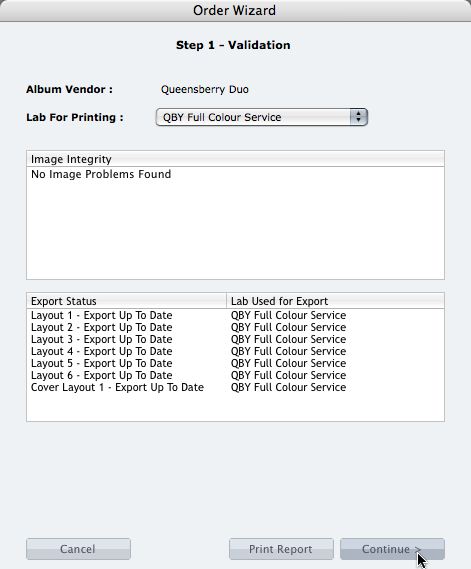
We're describing the perfect way to send us your print-and-bind order... After exporting your files you definitely shouldn't jump straight to LabFTP and send us the files - we wouldn't know what to do with them! Instead, always use the Remix Order Wizard. (You'll find it under the Album menu). Remix will validate your order and create an order "bundle" that contains everything we'll need to process your order - provided you follow these instructions: 1. Run your order through the Send Order Wizard. You'll find a tutorial here. The Wizard will ask what service you want (eg Print & Assemble) To View More >>
This entry was posted in by Admin
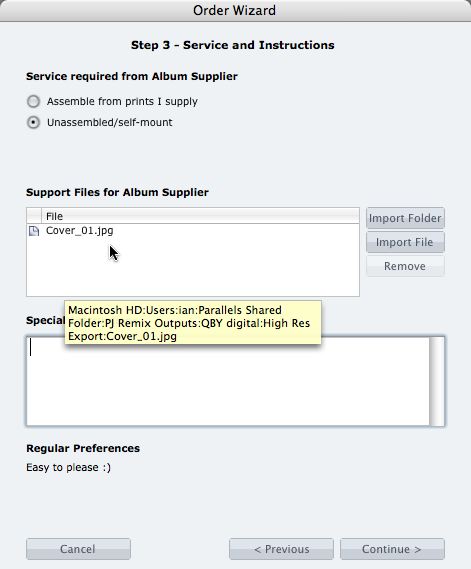
What if you want us to print your cover image, but nothing else? 1. When you fire up the Remix Order Wizard , choose either the "Assemble From Prints Supplied" or Don't Assemble" option. 2. On the same screen the Wizard will offer a place to include "support files" for your album supplier. Open your folder of High-Res Export files and drag in a copy of the cover image (don't double up by sending it to your lab to print as well). 3. Remix may ask you if you want us to print the cover image (generally it'll be obvious what you want, in which case Remix won't ask). Be sure to say Yes. 4. When the To View More >>
This entry was posted in by Admin

Cover layout design in PJ Remix Here are the first steps in preparing a perfect, hassle-free print-and-bind order, really fast. 1. First, upgrade to PJ Remix. If you have already, thank you. 2. Use Remix to design your cover as well as your page layouts. You'll get to frame and crop the cover image yourself, see exactly what it looks like and be sure that it looks good. For example, here you can see how much of the image in the photo front cover layout above has been cropped away. No problem in this case, but many images won't be suitable: 3. Export your cover AND page layouts using Remix's Export To View More >>
This entry was posted in by Admin
This post has been superseded by new Photojunction functionality. PJ Remix's Order Wizard saves "Bundles" (folders) of files to your hard disk ready for you to upload them to your album supplier and/or lab. But Remix itself doesn't do the upload. Queensberry does that with LabFTP. Somethimes confusion arises around two points: 1. Occasionally users think they're done once they've run through the Order Wizard. Not so. All you've done is email us to expect an order. You still need to upload the files. 2. Occasionally a photographer will open the bundle, take out what (s)he thinks we need and uploaded To View More >>
This entry was posted in by Admin
Continuing our tour of the major new features in the latest beta, check out this movie on Queensberry Connects about the FTP functionality we've built into v1.26b. We've added an upload function to the Order Wizard so you no longer need LabFTP. It's automatic, so you don't need to think about it – Remix just uploads everything the supplier needs. Even our resident geeks like not having to think for themselves. Occasionally. Cheers, Ian PS The Order Wizard only works with participating album suppliers - we're happy to talk to yours! To View More >>
This entry was posted in by Admin