Blog
Welcome


Recent posts
SEARCH RESULTS FOR: Send Order
As we announced back in February, we're in the process of streamlining the way Photojunction handles third-party vendors. As part of that process, we will tomorrow be removing the Cover Material, Cover Style, and Titles resources, as well as the largely unused “Send Order” functionality for all suppliers other than Queensberry. If you're using PJ to design Queensberry albums, or not using the functions listed above, you won't notice any difference. Only those designing for a handful of vendors are affected, and we understand that those most affected have been working through the transition To View More >>
This entry was posted in by Admin
As our colour correction policy outlines, when you order Full Colour Service we colour-correct your images so as to optimise natural skin-tones and achieve consistency across all the images in the album. However, if you run Photoshop actions or add special effects/tones to your images and the desired effect differs from these guidelines, we'd ask that you leave a quick note on your order to let us know, so we don't undo the work you've done on them. It's easy to leave notes in Photojunction: - Add notes to specific apertures by right-clicking on an image and selecting the 'Add/Edit Aperture To View More >>
This entry was posted in by Admin
Ok, the coach has said to pass it to the backs and they will chip and chase. For those who don't know what that means, stop a Kiwi in the street and ask. Or an Aussie. Maybe a Brit or the odd South African … although they do tend to get their forwards to drive it up the middle and kick the pill between the sticks. Sorry, I digress. Coach wants me back on the field, keep it short and get over the line. Come on, Ref, blow the whistle and let's get started! 6. Alignment tools OK, I'm cheating a bit here – this isn't a button but a complete tool kit. But get these working for you and life becomes To View More >>
This entry was posted in by Admin
Things have a habit of creeping up on you, as our friends at Seldex have reminded us by sending an email to their clients reminding them that come July they won't be able to use Photojunction's cover design and Send Order functions. (We announced as much here back in February.) We've counted Seldex as friends for years – in fact they sold Queensberry albums in Australia back in the day! - so this is a rather sad time, the culmination of a process that started to unfold a couple of years ago when we realised that most suppliers weren't going to support PJ as a universal album design tool, which To View More >>
This entry was posted in by Admin

We've now released v1.49 to fix a few minor issues in 1.48, but everything in this post is still current - Ed. In case you haven't noticed, we kiwis are very modest ;) Which is why I like announcing stuff that I didn't have much to do with, but I feel really good about, because I can sing its praises without feeling bad about myself! Anyway… The dev team have been busy busy today pushing out a new final release, and I think it's a really good one. They've put a lot of time and effort into refining features first released in v1.47, especially for Queensberry Press Books, but there's some juicy To View More >>
This entry was posted in by Admin
The purpose of our recent survey was to get a better picture of how you're using the software, and the features most important to you. It turns out you use Photojunction to design albums for almost a hundred album suppliers that we don't even offer resources for - no wonder a third of you "always" use Remix DIY! It's also clear that unless you're one of Queensberry's clients you're most likely using PJ primarily to design and export page layouts. That's not so surprising. Getting past "page design" requires a lot of input from vendors, and unfortunately they're much less engaged with PJ than their To View More >>
This entry was posted in by Admin
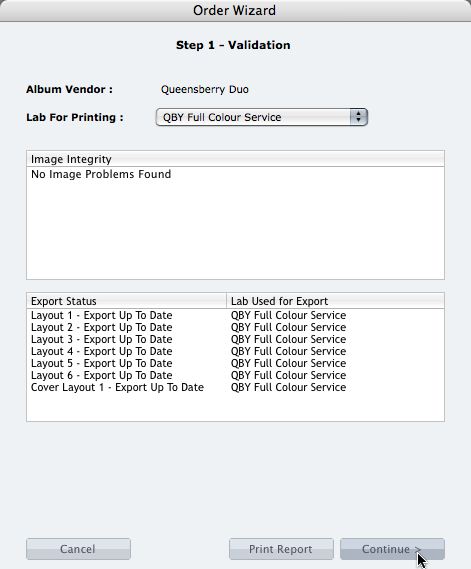
We're describing the perfect way to send us your print-and-bind order... After exporting your files you definitely shouldn't jump straight to LabFTP and send us the files - we wouldn't know what to do with them! Instead, always use the Remix Order Wizard. (You'll find it under the Album menu). Remix will validate your order and create an order "bundle" that contains everything we'll need to process your order - provided you follow these instructions: 1. Run your order through the Send Order Wizard. You'll find a tutorial here. The Wizard will ask what service you want (eg Print & Assemble) To View More >>
This entry was posted in by Admin
We owe a big thank you to all the people who completed our survey recently. We had a great response, and we thought you'd like to know the outcome. There were two major surprises, as you'll see. 1. We listed all the vendors whose resources we distribute, and asked you to tell us which companies you use. People named an average of two companies each, and some people named several. 2. Over a third named Queensberry as one of their suppliers, but the first big surprise was that 40% of respondents wrote in the name of a company whose resources we don't offer. In fact we discovered that PJ is used to To View More >>
This entry was posted in by Admin
It's a fiddly job assembling an album, but our assembly team can save you the time and hassle. They assemble thousands and thousands each year - so they're pretty good at it! And the pay-off is another 2-3 hours saved per job that you can put to better use. Just think ... all of our systems are integrated - design, colour correction, printing, album construction, and assembly. Hit the Send Order button in Photojunction and apart from the small matter of paying, that's pretty much it until the album arrives back ready for your client. And of course if necessary we'll contact you to make sure everything To View More >>
This entry was posted in by Admin

This screen appears immediately after you send your album order, and that blue link is a quick-smart way to squeeze the value out of the work you've just done and help boost your income. Click it, and the templates from the album you've just designed, confirmed and ordered will be automatically uploaded to the Photojunction Store ready to be sold. All you'll have to do is fill out a few important details in the Sell window, like a short item description and how much you want to sell your collection for, and hit Done. Try it next time you send an order. Cheers, Nigel To View More >>
This entry was posted in by Admin