Blog
Welcome


Recent posts
SEARCH RESULTS FOR: Family

Between you and me, we've just quietly published Queensberry's Photographer Directory. Check it out here and tell us what you think. Enter your own location and you'll probably see we've "auto-published" you (provided we have your website details – that's public after all) but if you'd like to edit and approve your listing, you can do so by logging on to your account on our secure website and clicking on "Set Up Directory Listing". You can edit your location, tell people something about your studio, and add your Email, Twitter and FaceBook details. (There were people working on their listings To View More >>
This entry was posted in by Admin
Every now and then we see a sample album with images from several weddings in it. We call them "Greatest Hits" albums. Even after discounts a sample album can be a big investment – we know that, especially when you're starting out – but this is not a good idea for at least three reasons. 1. Because it's not what your clients will be buying, it's hard for them to relate to. A bit of a puzzle. 2. Even worse, it's not convincing evidence that you're up to the job. Couldn't you find enough good images from one wedding, they'll be thinking... 3. What an album does is tell a story – of their day, To View More >>
This entry was posted in by Admin
This week's webinar is our 'Intro to Photojunction' presentation taking place right here (online) on Thursday 27 May @ 9am (NZT). In this webinar Danny will show you how to fire up the software and start using it. He’ll also walk you through everything from registering, to designing an album, to exporting and sending. As always, it’s free to attend and everyone’s welcome. Click here to register See you there! Cheers, Nigel PS Thursday 27 May @ 9am NZT time means: AUSTRALIA – Thursday 27 May 7:00 AM NEW ZEALAND – Thursday 27 May 9:00 AM UK – Wednesday 26 May 10:00 PM USA (West Coast) To View More >>
This entry was posted in by Admin

It's been a while, but this year Photojunction and Queensberry are returning to PMA's Digital Life Expo in Melbourne, Australia. If you're attending the show we'd love you to drop by and say hi. We'll be there with the Queensberry team who will have an impressive bunch of new albums with them including their newly released Musée album, so make sure you come and check them out too. The details: PMA Digital Life Expo: 4-6 June 2010 Melbourne Exhibition and Convention Center, Melbourne @ Stand # 450 See you there! Cheers, Danny PS Pre-register online here and gain free entry to the exhibition and To View More >>
This entry was posted in by Admin
Got a Photojunction question bugging you? Then come along to our pure Question and Answer webinar tomorrow... Danny, Christine and I are yours for an hour! We'll be answering your questions live throughout the hour, but if you'd like to submit a question early, send it to nigel@queensberry.com and we'll do our best to cover it. It's free to attend and everyone's welcome, so join us tomorrow - Thursday 20 May @ 9am (NZT) Click here to register See you tomorrow loaded with questions! Cheers, Nigel PS Thursday 20 May @ 9am NZT time means: AUSTRALIA – Thursday 20th May 7:00 AM NEW ZEALAND – Thursday To View More >>
This entry was posted in by Admin

It's been a while, but this year Queensberry and Photojunction are returning to PMA's Digital Life Expo in Melbourne, Australia. We love opportunities like this to meet old friends and make new ones … and we hope you’ll be among them. Queensberry is for people who believe that the way to succeed is to stand out from the crowd, not join it, and we have two new projects to talk to you about: 1. As you may know Apple chose Queensberry as one of “the world’s finest bookmakers” to introduce their album design and ordering service in Aperture 3. Far from us to say why they chose us, so come To View More >>
This entry was posted in by Admin
Here's a quick, real-life story about Photojunction's auto-save templates feature. Last week we got a slightly panicked call from a PJ user who'd lost her entire album design. Frustrating. Support treats calls like this as detective stories, and they're really good at solving them. But what happened is less important than what to do about it. She thought she'd need to totally re-design her album, but we introduced her to Photojunction's auto-save templates feature. During the design of every album you do, Photojunction auto-saves templates of your design. It's not an option you can turn on and To View More >>
This entry was posted in by Admin

By tolerances we mean the threshold at which Photojunction's Problem Reporter will report an aperture misalignment. Confusing I know, so let me explain... Photojunction detects apertures that aren't exactly aligned with each other (misalignments) and warns you about them in the Problem Reporter. Because misalignments show up as 'Warnings' in the Problem Reporter you could ignore them and move on to send the order if you wanted. However we strongly recommend checking and resolving any reported misalignments as a slight aperture misalignment (say 1-2mm) is probably not deliberate, and will probably To View More >>
This entry was posted in by Admin
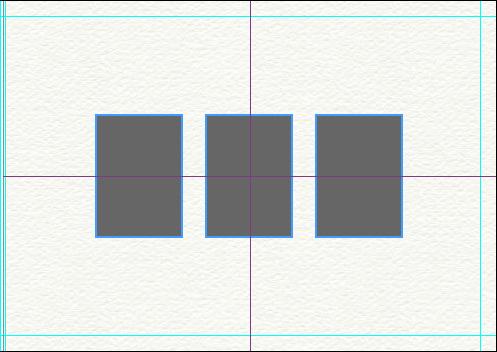
A couple of changes have been made to the way templates operate, making them even smarter than they already were. Here's the low-down... 1) When dropping a template onto a layout, Photojunction no longer Groups the apertures, which should make templates easier to understand for any users who haven't come to terms with Groups yet. Photojunction automatically scales and centers the template on the layout for you. That'll make editing a whole lot quicker and easier. 2) When using a Queensberry Duo template, Photojunction remembers which apertures were Matted and which were Digital. As with all templates, To View More >>
This entry was posted in by Admin
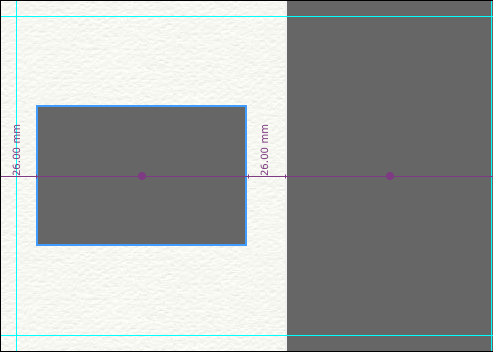
We introduced Smart Centering in release 1.32, and you told us you loved it. So in 1.39b, we've made Smart Centering a whole lot smarter. Photojunction now Smart Centers apertures in the remaining available space on a layout. Here's an example of a split mat (Fill Full Height or Fill Full Width) aperture layout. The smaller of the two apertures has been centered in the remaining available space on the mat, as the measurements and purple alignment line indicates. You can also hover your mouse over the 'Align to page centre' button in the Tools window to find the center of the remaining available To View More >>
This entry was posted in by Admin