Blog
Welcome


Recent posts
SEARCH RESULTS FOR: Photojunction
Our dear friend, Ian. Most of you haven't met him, but there's a good chance he's saved your bacon once or twice. Ian Cameron has been a crucial member of the Photojunction team, and is leaving us to head back down-the-line to his home town. The trend in the tech industry is to skip jobs every 18 months or so looking for the new best thing, but that hasn't been the case for us and certainly not for Ian. Ian has been with us for 6 years, I hazard a guess he's answered over 40,000 emails and 12,000 phone calls! This doesn't include tireless work on resources, bug busting, and in the ol' days, CD To View More >>
This entry was posted in by Admin
The absolute easiest way to get up and running with Photojunction is to jump on one of our free Intro to Photojunction webinars. So if you're a new PJ convert - there were plenty from WPPI and FOCUS - or just want a good PJ refresher, join us for our next Intro to Photojunction webinar scheduled for 10am this Wednesday (NZT). Click here to register Danny will show you how to fire up the software and start using it, walking you through everything from registering, to designing an album, to exporting and sending... And he'll also talk about the recent integration with albumexposure. We'd love you To View More >>
This entry was posted in by Admin

Check out the Reports feature in Photojunction. They're good for the business end of the album process, like signing off designs and handling edits. Album Menu > Generate Reports Photojunction creates reports as PDFs so they're ideal for sending to clients. Here's an example of a page from a Album Report (Small images) - click to enlarge: There's several other report options to choose from, so have a play and see which best suits your needs. Next in this series Cheers, Danny To View More >>
This entry was posted in by Admin

All the options in Slide show can be set as defaults in preferences. Big time saver. Next in this series Cheers, Danny To View More >>
This entry was posted in by Admin
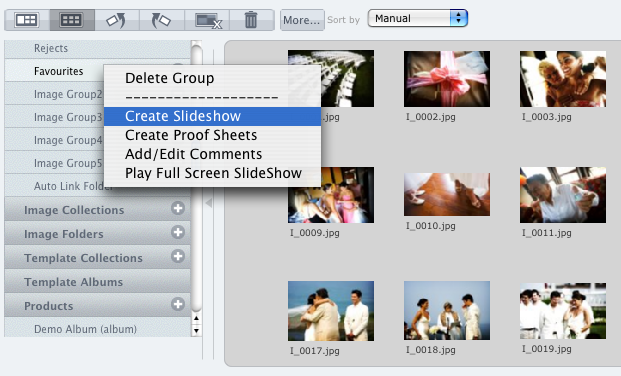
Photojunction's Slideshow creator might not be the most full featured app out there, but it's certainly one of the quickest and it outputs the smallest file size around. Same deal as Proof Sheets. Right click on the Group or Collection you want to create the slideshow from, and select 'Create Slideshow'. Or take the long way round... Create a new product and select Slideshow from the Project Setup window. Otherwise, you can also right-click on any layout in the Preview window and select 'Create Slideshow'. Here's a couple of previous posts about Remix's slideshow feature... Remix's Slideshow feature To View More >>
This entry was posted in by Admin

Proof sheets is a feature we’ve revived from PJ Retro, only it's now way better... And quicker. Here's the quickest way to create Proof Sheets (it only takes two clicks!): Right click on the Image Group or Collection you want to create Proof Sheets for, and hit 'Create Proof Sheets'. Alternatively you could take the back streets and create Proof Sheets as a new product in the event window: Hit the plus button (+) next to Products on the accordion menu... And then select Proof Sheets from the options in the Project Setup window. Or... Add them as a new product via the browser menu and select the To View More >>
This entry was posted in by Admin
We regret to advise that due to a line break outside our control our secure websites and email are down. That means you can't access your Queensberry account, Queensberry's and Photojunction's registration systems aren't working and we cannot access your email. Your email should have been received but we can't get to it: to avoid confusion please don't resend it unless you don't hear from us within normal service times once we're back online. It could be 24 hours before we're back up. Our apologies for the inconvenience. When we get more news we'll post it here. To View More >>
This entry was posted in by Admin
We regret to advise that due to a line break outside our control our secure websites and email are down. That means you can't access your Queensberry account, Queensberry's and Photojunction's registration systems aren't working and we cannot access your email. Your email should have been received but we can't get to it: to avoid confusion please don't resend it unless you don't hear from us within normal service times once we're back online. It could be 24 hours before we're back up. Our apologies for the inconvenience. When we get more news we'll post it here. To View More >>
This entry was posted in by Admin

Our Collection Builder reduces image sorting (and selling) to a few quick and easy steps. Here's a previous post that tells you all about it: Sorting is so easy Just in case you were wondering, it uses the Smart Full Screen feature too ;) Next in this series Cheers, Danny To View More >>
This entry was posted in by Admin

Sometimes we have trouble persuading people that Photojunction displays images in overlay albums exactly as they will appear in the album. They think what you see on screen includes the area of the print that will get lost under the mat. That may be because other programs "grey out" the area that will be hidden (we do the same with photo front covers, but nowhere else). Photojunction hides it completely because we want to show you what the album will look like - no distractions! Anyway what you on screen is exactly what you'll see in the album. Take a look at the image panel of the tools window. To View More >>
This entry was posted in by Admin