Blog
Welcome


Recent posts
SEARCH RESULTS FOR: Album Design

Photojunction's integration with albumexposure just keeps getting better. albumexposure now offers you the ability add music to accompany a client's album design, from within Photojunction. Just select the 'Proof with albumexposure' option from the Album menu in Photojunction, then on the AE start screen, choose the 'Upload Music file' option from the 'Select Song' drop down list. Cheers, Nigel PS music files need to be in MP3 format. To View More >>
This entry was posted in by Admin
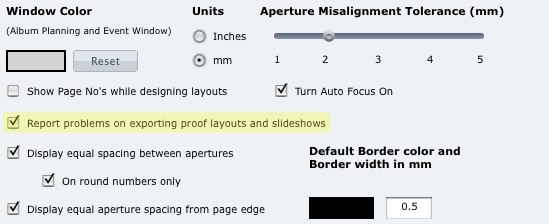
You can now choose in the Photojunction Preferences to have the Problem Reporter report on any problems in your album design when you create a slideshow or proof sheets from it. Why's that useful? Well you'll need any problems fixed before you order the album, so if you're going to create a slideshow or proof sheets of it, you can be sure they're perfect too, and exactly as per the album. This option is set on as a default but you can turn it off by heading to the Preferences and unchecking 'Report problems on exporting proof layouts and slideshows'. Easy. Cheers, Nigel To View More >>
This entry was posted in by Admin

Jerry Tomko is a long time friend who comes to mind whenever we think of heavy Photojunction users. He designs and sells a huge number of albums each year and has been using the software for as long as we can remember. 1) What impact does Photojunction have on your album design workflow? Photojunction has had a huge impact on my album design workflow. I have always been a firm believer in predesign - and in wedding albums, and I truly believe you should be able to see what you are purchasing. Even back in the film days, I would always present to the client what the album would look like before To View More >>
This entry was posted in Uncategorized by Admin
I recently held a small workshop in the UK at the studio of Zoe Richards just out of Liverpool. It was intimate (there were only nine of us). We discussed album design and particularly spoke about the Musée. One of the ideas of that album is to create a feeling of intimacy. The resounding lesson from our discussion was about that and simplicity. Too often people cram images into albums to the point where there is no room to rest your eyes. The Musée design uses space to reinforce the luxury and quality feel of the product. There is something exciting about an intimate moment in a cupboard but To View More >>
This entry was posted in by Admin

It's been a while, but this year Queensberry and Photojunction are returning to PMA's Digital Life Expo in Melbourne, Australia. We love opportunities like this to meet old friends and make new ones … and we hope you’ll be among them. Queensberry is for people who believe that the way to succeed is to stand out from the crowd, not join it, and we have two new projects to talk to you about: 1. As you may know Apple chose Queensberry as one of “the world’s finest bookmakers” to introduce their album design and ordering service in Aperture 3. Far from us to say why they chose us, so come To View More >>
This entry was posted in by Admin
Here's a quick, real-life story about Photojunction's auto-save templates feature. Last week we got a slightly panicked call from a PJ user who'd lost her entire album design. Frustrating. Support treats calls like this as detective stories, and they're really good at solving them. But what happened is less important than what to do about it. She thought she'd need to totally re-design her album, but we introduced her to Photojunction's auto-save templates feature. During the design of every album you do, Photojunction auto-saves templates of your design. It's not an option you can turn on and To View More >>
This entry was posted in by Admin
Who do we hope will read our Bride Book? Your clients! Our Bride Book is designed to drive business your way and add value to your photography. We currently include two books with every album we sell. Here’s how we suggest you use them. Don’t give them to the bride and groom Yes, we include books with each album, but they’re not for that happy couple ... they’ve already purchased. Take them out of the box and use them to book more weddings and more albums. When they book with you, give couples a copy to take home They’ll have something beautiful to confirm the value of Queensberry albums, To View More >>
This entry was posted in by Admin

Man about town Jerry Ghionis is a great supporter of Photojunction and spreads the word through his various speaking engagements. 1) What sort of feedback do you hear about Photojunction? After many years of not doing my own album plans, I have now gone back to designing my albums again. Since I now run a boutique studio, my involvement in the pre-production and album design process is very important. Not being a technically minded person naturally, I downloaded the trial version of Photojunction and pretty much learned how to use it in about 10 minutes. What I noticed immediately about it To View More >>
This entry was posted in by Admin

We don't know many people who know their way around Photojunction better than Chip Gillespie. Especially when it comes to shortcuts. We call him a Power User. (He's also the founder of Blogstomp, which is well worth checking out.) 1) You're a PJ power user – how long have you been using Photojunction and what attracted you to it in the first place? I have been using PhotoJunction for a little over a year. To be truthful, I was skeptical at first as I had what I believed to be a near-perfect album design process using Photoshop. On the recommendation of a friend and fellow photographer/designer, To View More >>
This entry was posted in Uncategorized by Admin

In just a few days the Queensberry team will be heading off to the excitement and bedlam of WPPI and FOCUS. We love this opportunity to visit the States and the UK, meet old friends and make new ones ... and we hope you'll be among them. Queensberry is for people who believe that the way to succeed is to stand out from the crowd, not join it, and this year we have two new projects to talk to you about: 1. As you may know Apple chose Queensberry as one of "the world's finest bookmakers" to introduce their album design and ordering service in Aperture 3. Far from us to say why they chose us, so come To View More >>
This entry was posted in by Admin