Blog
Welcome

This is the blog for professional photographers, and those who aspire to be. Our aim is to help professional photographers build long-term, sustainable careers.

loading facebook page
Recent posts
I know we've been bleating on a bit about the Problem Reporter webinar recently, but Danny struck gold on several occasions during it and it'd be unfair to not share. Nanny ghosted over them the other day, but let's take a closer look. Hopefully the penny will drop for you too. Duplicate Lots of alignment issues the problem reporter reports have to do with apertures (usually custom apertures) being slightly different sizes. To be clear, we recommend using custom-sized apertures only when necessary, but If you want several custom apertures all the same size on a layout, you don't need to make them one at a time. Just create one and duplicate it – a safe way to ensure they're all the same size. Plus the easy duplicate shortcut it makes it much quicker. Duplicate shortcut: Command>D or Ctrl>DCreating an aperture the same size as another group of apertures Another common alignment and spacing hurdle is when a group of apertures are misaligned. In the below example, although the two lines of apertures look aligned, the bottom is actually 1mm shorter than the combined length of the apertures above it. 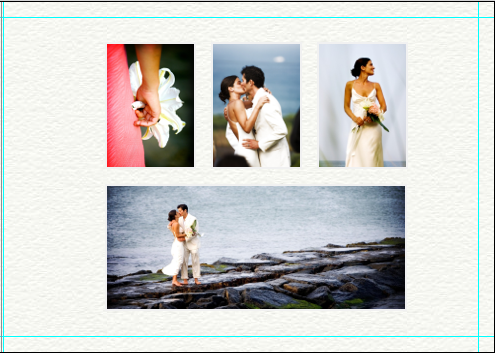 Photojunction figures that's not deliberate, and lets you know about it in the PR. Now here's the money trick. To create an aperture that is exactly the same size as the three images above it, batch select the group of images, right click, and select Add new aperture with dimensions of the group. And that'll do this (now just drag an image into the blank aperture)...
 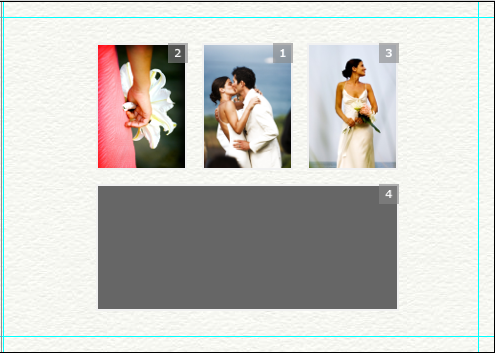 Adjusting default spacing between apertures Open the Photojunction Preferences and select the Supplier option. On the right of the window you've got several options allowing you to customise: Default space between apertures, Default space to page edge, and Default Aperture size. Obviously the supplier will have a minimum you can't set below, but if your design style is to have a 20mm gap between apertures, for example, set that here and it'll make spacing them much easier. Same goes for the space from the page edge if you like, and the default size of images you drag on to the layout. HTH Cheers, Nigel
Photojunction figures that's not deliberate, and lets you know about it in the PR. Now here's the money trick. To create an aperture that is exactly the same size as the three images above it, batch select the group of images, right click, and select Add new aperture with dimensions of the group. And that'll do this (now just drag an image into the blank aperture)... Adjusting default spacing between apertures Open the Photojunction Preferences and select the Supplier option. On the right of the window you've got several options allowing you to customise: Default space between apertures, Default space to page edge, and Default Aperture size. Obviously the supplier will have a minimum you can't set below, but if your design style is to have a 20mm gap between apertures, for example, set that here and it'll make spacing them much easier. Same goes for the space from the page edge if you like, and the default size of images you drag on to the layout. HTH Cheers, Nigel
Email: info@queensberry.com
Free Phone Numbers:
New Zealand: 0800 905 905
Australia: 1800 146 251
USA: +18668350851
UK: 0800 808 5271
Canada: +1 855 581 0370